- Published on
Create Masonry layout
- Authors

- Name
- Poojesh Shetty
- @ShettyPoojesh
Introduction
Recently I was reading some system design articles through which I came across masonry layout. Typically you will see this layout in application like pinterest wherein the images are stacked as per its individual height and width. They don’t follow the typical grid structure making the look and feel more attractive.
Current short comings.
I explored some options of implementing the masonry layout. One was with the css property with grid template masonry. But currently it is an experimental css property which is not supported in all browsers. Another one consisted of using following column wise ordering of images with a prefixed parent height and arranging the image one column at a time. But the problem with this approach was adjusting pagination actions like scrolling and loading new images creates problem since this will lead to again rendering the whole list making it less efficient and usable.
Current approach
The approach that I will talk about is using dynamic absolute positioning the images using its respective width and height value. We will also discuss on how by using this approach we will also be able to have virtualization in place without any much changes.
How it works
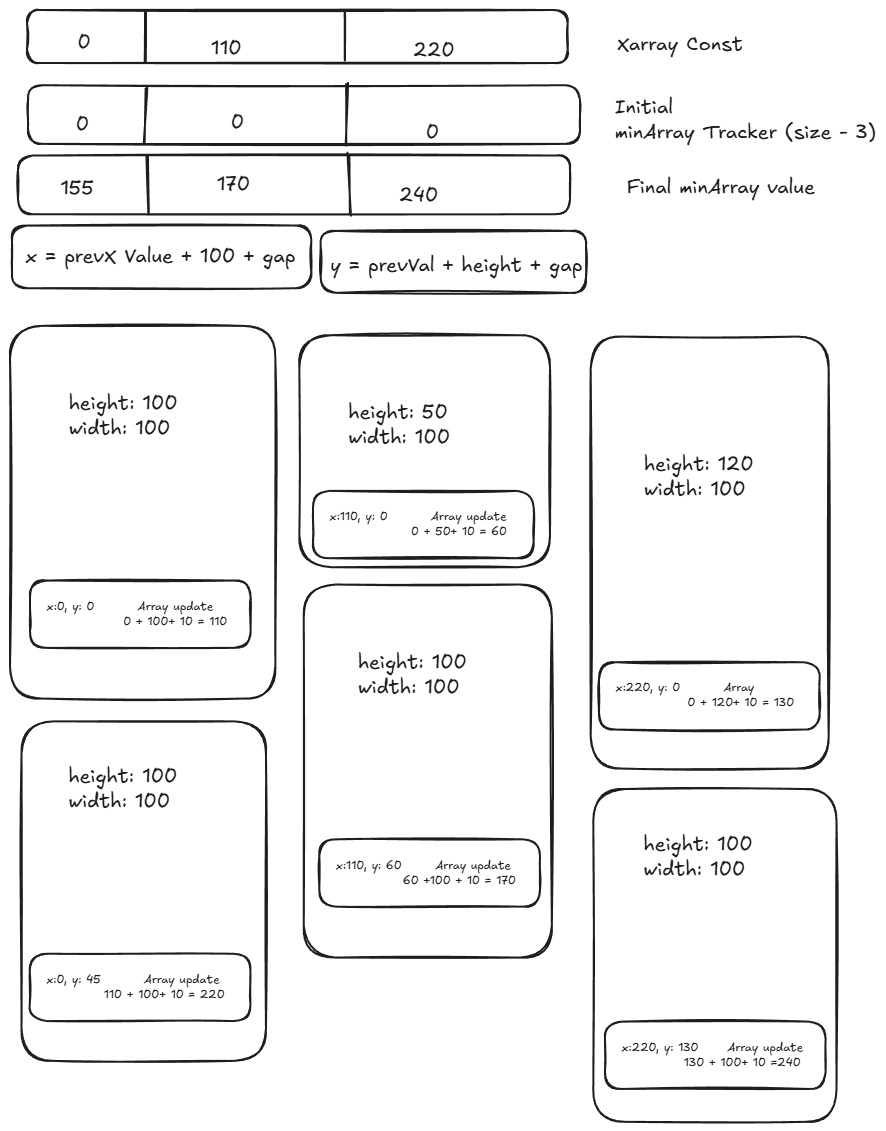
- Define an empty array of initial value 0 of size on the basis of number of columns you want to show in your layout
- Define a constant Xarray value which will have defined starting x coordinate value for images to be aligned
- Get the index of the min value from the defined array
- Map particular image with new x and y value where x is min index of defined array and y is the array value of min index position
- Update the array min index with previous value + image height value + a constant gap (eg: 10)
Virtualization
For virtualization, we need to filter the api images and get only those images that intersect to the user scroll position.
Following is the code flow to achieve virtualisation
- First get the list of the images from the api
- Track the scroll position of the user
- Based on the height and intersection of the screen filter out and update the state with all the images that will be part of the intersection.
- You can expand the filtered list from start and end in order to avoid any unwanted empty screen areas
Code
The following repository as a working code for masonry layout. masonry-virtualization
Note: The code might not be optimized since the real focus was on the ui front and the column number is hard coded to 3 columns. For your purpose, you may want to make it dynamic on the basis of the width of the screen
Ending thought
My main aim was to give a high level view of how the masonry layout can be designed with virtualization in place. Certain approach could be code out better. I will leave it up to you on how you want to take the following example forward and use it as per your need. Thanks and happy coding!!!